
Ever feel that nagging ache in your back after a long day at your desk? Or perhaps your wrists are feeling the strain from endless typing?
You’re not alone. Ergonomic injuries are more common than you might think, and they can sneak up on you if you’re not careful. The good news is that they are preventable. By making a few simple changes to your daily routine, you can protect your body from these aches and pains.
Imagine working comfortably, free from discomfort, and with increased productivity. Are you ready to discover how you can achieve this? Read on to learn the secrets to preventing ergonomic injuries and take control of your well-being today.

Credit: www.facebook.com
Ergonomic Basics
Understanding ergonomic basics is essential for avoiding workplace injuries. Ergonomics involves designing workspaces that fit the user’s needs. This can help reduce stress and increase comfort. Simple changes can make a big difference. Let’s explore some key elements of ergonomic basics.
Proper Desk Setup
Your desk should match your height. The computer screen should be at eye level. This prevents neck strain. Keep your feet flat on the floor. Use a chair that supports your lower back. Arrange items within easy reach. This setup promotes better posture.
Correct Chair Positioning
A good chair supports your back. Adjust the chair height so your knees are level with your hips. Use armrests to support your arms. This reduces shoulder strain. The chair should move easily. This allows you to shift positions often.
Keyboard And Mouse Placement
Place the keyboard close to you. Keep your wrists straight and relaxed. Position the mouse at the same level as the keyboard. Use your whole arm to move the mouse. This helps avoid wrist pain. Consider a wrist rest for added support.
Lighting And Screen Brightness
Good lighting reduces eye strain. Avoid glare on your screen. Adjust screen brightness to match the room light. Use blinds or curtains to control natural light. Take breaks to rest your eyes. Look away from the screen every 20 minutes.
Breaks And Movement
Take regular breaks to stand and stretch. This helps prevent stiffness. Set a timer to remind you. Simple exercises can improve circulation. Walk around the office for a few minutes. These breaks boost energy and focus.
Common Ergonomic Injuries
Understanding ergonomic injuries is vital for a healthy workspace. These injuries affect muscles and nerves. Preventing them involves proper posture, regular breaks, and ergonomic equipment.
Ergonomic injuries are more common than you might think, especially with the increasing number of people working long hours at desks. These injuries often develop gradually over time, sneaking up on you until they become a significant issue. Recognizing them early and taking proactive steps can save you from pain and discomfort down the line.Repetitive Strain Injuries (rsi)
Repetitive Strain Injuries are the result of repeating the same motion over and over. Typing, for example, can lead to issues like carpal tunnel syndrome. If you find your wrist or hand aching after a long day of work, this might be the culprit.Back Pain
Sitting for extended periods can wreak havoc on your back. Poor posture often amplifies the problem. Consider how often you adjust your position or stretch throughout the day—is it enough?Neck Strain
Your monitor’s position plays a critical role in neck strain. If you’re constantly looking down or up, your neck might be paying the price. Ensuring your screen is at eye level can make a world of difference.Eye Strain
Staring at screens for hours can lead to eye strain. Symptoms include dry eyes and headaches. Implementing the 20-20-20 rule—every 20 minutes, look at something 20 feet away for 20 seconds—can help alleviate the strain.Shoulder Pain
Shoulder pain often creeps up due to poor desk setup. If your keyboard or mouse isn’t at the correct height, it can lead to tension in your shoulders. Regularly check your desk arrangement to avoid this common issue. Preventing these ergonomic injuries doesn’t require drastic changes. Simple adjustments in your daily routine can lead to significant improvements. What changes can you make today to protect yourself from these common injuries?Proper Workspace Setup
Proper workspace setup is crucial to preventing ergonomic injuries. An ergonomically sound workspace reduces strain on your body. It enhances productivity and promotes overall well-being. A well-arranged workspace minimizes discomfort and supports your daily tasks. Let’s explore key components of a proper workspace setup.
Desk And Chair Arrangement
Your desk should be at elbow height. This position allows your arms to rest naturally. Choose a chair with adjustable height and lumbar support. Your feet should be flat on the floor or on a footrest. Ensure your chair promotes a neutral spine position.
Monitor Positioning
Place your monitor directly in front of you. The top of the screen should be at eye level. Maintain a distance of 20-30 inches from your eyes. A slight tilt back can reduce glare and strain. Avoid awkward angles to prevent neck discomfort.
Keyboard And Mouse Placement
Your keyboard should be close to your body. Position it so your wrists remain straight. Keep your mouse within easy reach. Use a mouse pad with wrist support. This setup prevents wrist strain and discomfort.
Posture And Movement
Proper posture and movement play a key role in preventing ergonomic injuries. Regular breaks and stretching help maintain muscle flexibility. Using ergonomic furniture supports the body and reduces strain during prolonged activities.
Maintaining proper posture and movement is vital in preventing ergonomic injuries, especially if you spend long hours working at a desk. It’s easy to underestimate how much your sitting habits and movement patterns can impact your health. By focusing on posture and ensuring regular movement, you can significantly reduce the risk of discomfort and long-term injuries.Correct Sitting Posture
Sitting correctly is more than just keeping your back straight. Ensure your feet are flat on the ground, and your knees are at a right angle. Your chair should support the natural curve of your spine, with your hips slightly higher than your knees. A few years ago, I noticed constant back pain after long workdays. Adjusting my chair height and using a lumbar support cushion made a world of difference. Have you checked if your chair setup supports your posture effectively?Frequent Breaks
Taking breaks is crucial, not just for your eyes and mind but for your body too. Stand up, walk around, and change your posture every 30 minutes. Set a timer if you have to; it’s worth it. Consider the Pomodoro Technique, where you work for 25 minutes and then take a 5-minute break. This not only boosts productivity but also keeps you moving. What strategies do you use to remind yourself to take breaks?Stretching Exercises
Incorporating stretching exercises into your daily routine can enhance flexibility and relieve muscle tension. Simple stretches like neck rolls, shoulder shrugs, and wrist stretches are effective. Try standing up and doing a quick stretch every couple of hours. I found that stretching my arms and back during breaks not only eased muscle tension but also refreshed my mind. How often do you stretch during your workday? By focusing on these simple yet effective practices, you can maintain better posture and movement throughout your day. Implement these tips and notice the difference they make in your comfort and productivity.Tools And Equipment
Preventing ergonomic injuries often hinges on the tools and equipment you use daily. A well-equipped workspace can significantly reduce the risk of strain and discomfort. Understanding how to select and utilize these tools can transform your work environment into a haven of productivity and health. Let’s dive into some critical components that can make a world of difference.
Ergonomic Accessories
Ergonomic accessories are your frontline defense against injuries. Items like wrist supports or mouse pads with gel cushions can alleviate pressure on your joints. Have you ever noticed discomfort after hours of typing? These simple additions can help. They provide comfort and encourage a natural hand position.
Think about investing in an ergonomic keyboard. It can make typing less strenuous and more efficient. Such accessories are not just for the tech-savvy; they’re essential for anyone wanting to protect their body from repetitive stress.
Adjustable Furniture
Adjustable furniture is another game changer in preventing ergonomic injuries. Consider an adjustable chair that supports your back while allowing your feet to rest flat on the ground. Many people overlook the importance of chair height, but it’s vital for maintaining proper posture.
Have you tried standing desks? They offer flexibility and can reduce the amount of time you spend sitting. You might be surprised at how much more energized you feel when alternating between sitting and standing.
Supportive Devices
Supportive devices are essential for maintaining body alignment. Items like lumbar support cushions can make sitting less taxing on your spine. If you’ve ever experienced back pain after a long day, you know how crucial this support can be.
Footrests are another underappreciated tool. They help keep your legs in a comfortable position, reducing pressure on your lower back. If you’re someone who spends hours at a desk, these devices can make a noticeable difference.
Are you aware of how these tools and equipment can enhance your daily routine? Taking proactive steps now can prevent discomfort and injuries later. What simple changes can you make today to ensure a healthier tomorrow?

Credit: www.facebook.com
Work Habits
Work habits play a crucial role in preventing ergonomic injuries. By paying attention to how you move, vary tasks, and manage time, you can maintain a healthier workspace. Developing good work habits reduces strain and boosts productivity.
Mindful Movements
Being aware of your movements can prevent strain. Sit with your feet flat on the floor. Keep your back straight and shoulders relaxed. Adjust your chair so your elbows are at a 90-degree angle. When reaching for items, avoid twisting your body. Stand up and stretch regularly to ease tension. Move smoothly and with intention.
Task Variation
Doing the same task continuously can lead to fatigue. Break up your work with different activities. Alternate between sitting and standing tasks. Include short walks or stretches between tasks. This refreshes your muscles and reduces stress. Create a routine that balances different types of work.
Time Management
Organize your time to avoid overworking any one area of your body. Set timers to remind you to take breaks. Use these breaks to rest and reset. Plan your day with a mix of tasks requiring different movements. This helps distribute physical stress evenly. Prioritize tasks to manage your workload efficiently.
Technology And Ergonomics
Technology plays a crucial role in preventing ergonomic injuries. Modern tools and gadgets offer solutions that enhance comfort and safety in the workplace. By integrating technology with ergonomics, individuals can reduce the risk of musculoskeletal disorders. This approach not only improves productivity but also promotes a healthier work environment.
Software Solutions
Specialized software helps identify ergonomic risks. It analyzes posture, movement, and workstation setup. These applications offer real-time feedback and suggestions. For example, reminders to take breaks or adjust seating can be automated. This ensures that individuals maintain ergonomic positions throughout the day.
Many programs also create personalized ergonomic plans. They consider individual needs and preferences. Such customization enhances comfort and reduces strain. Employers benefit by reducing injury-related costs. Employees enjoy a safer and more comfortable workspace.
Wearable Technology
Wearables can monitor physical activity and posture. Devices like smart watches track movement patterns. This data helps identify habits that may lead to strain. Alerts can be set up to warn users of poor posture. By receiving instant feedback, users can adjust their actions promptly.
Some wearables even offer guidance on improving posture. They vibrate or beep when detecting incorrect positions. This direct feedback helps users correct their posture immediately. Over time, these adjustments can significantly reduce the risk of injury.
Wearable technology also supports health tracking. Monitoring heart rates and stress levels can provide insights. Users can manage their wellness better, reducing overall physical strain. This holistic approach ensures that technology aids both ergonomics and general health.
Awareness And Training
Proper training raises awareness about ergonomic practices, reducing injury risk. Regular workshops teach correct posture and equipment handling.
Awareness and training are vital in preventing ergonomic injuries. Educating employees helps them recognize potential risks. Training sessions promote safer work practices. Knowledge empowers staff to adopt better postures and techniques. This proactive approach reduces injury risk.Educational Resources
Provide accessible educational resources for employees. Offer guides on ergonomic best practices. Use videos and infographics for easy learning. These resources should address common workplace scenarios. Ensure materials are clear and concise. Regular updates keep information relevant and effective.Employee Workshops
Organize interactive workshops for hands-on training. Simulate real work situations to illustrate risks. Encourage staff to ask questions and share experiences. Workshops foster a culture of safety and awareness. They help employees internalize ergonomic principles. Regular workshops ensure continuous learning and adaptation.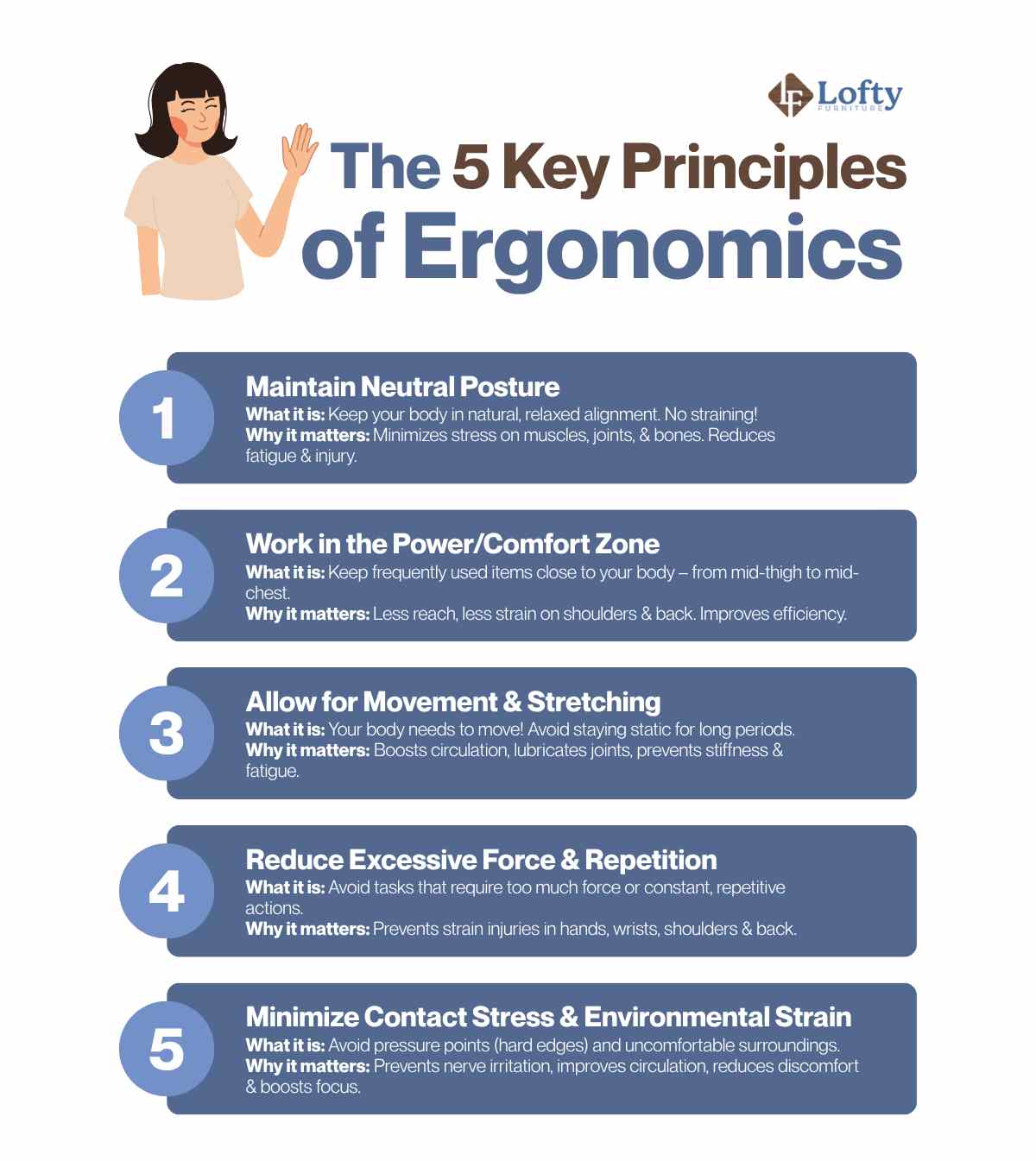
Credit: loftyfurniture.com
Frequently Asked Questions
What Are Common Ergonomic Injuries?
Common ergonomic injuries include carpal tunnel syndrome, tendonitis, and lower back pain. These injuries result from poor posture, repetitive motions, or improper workstation setup. Regular breaks and proper ergonomics can help prevent these injuries and enhance overall health.
How Can I Improve My Workstation Ergonomics?
To improve workstation ergonomics, adjust your chair and desk height. Ensure your monitor is at eye level and use ergonomic keyboards and mouse. Position your feet flat on the ground and keep your wrists straight. Regularly stretch and take short breaks to avoid muscle strain.
Why Are Ergonomic Injuries Increasing?
Ergonomic injuries are increasing due to prolonged computer use and sedentary lifestyles. Poor posture and repetitive tasks without breaks contribute to these injuries. Awareness and implementing ergonomic practices can help reduce the risk of these injuries and improve comfort at work.
What Exercises Help Prevent Ergonomic Injuries?
Exercises like stretching, yoga, and strength training can help prevent ergonomic injuries. Focus on exercises that target your back, neck, and wrists. Regular movement and flexibility exercises improve circulation and reduce muscle tension, enhancing overall ergonomic health.
Conclusion
Preventing ergonomic injuries is crucial for a healthy work environment. Simple changes make a big difference. Adjust chairs and desks to fit your body. Take regular breaks to move and stretch. Use tools that reduce strain, like ergonomic keyboards. Listen to your body’s signals; discomfort can lead to injury.
Educate yourself and others about proper ergonomics. Prioritize comfort and safety to boost productivity. A little effort today saves pain tomorrow. Stay mindful of posture and workspace setup. Protect your health by adopting these practices daily. Embrace ergonomic habits for a happier, healthier you.